
Everything your shop needs, in one app
Kasaa POS replaces the calculator, the notebook and the guesswork with one tool you can run from your phone and your computer.
Fast checkout
Ring up a sale in seconds — scan a barcode or tap an item, set the quantity, take cash or mobile money, done.
Retail and wholesale
Sell the same article by the piece and by the carton, each at its own price, from one stock that Kasaa converts as you sell.
Barcode scanning
Scan with your phone camera at the counter, or plug in a handheld scanner on a computer till — Kasaa reads both.
Barcode labels you print yourself
For goods that arrive with no usable barcode, Kasaa creates a proper code per article and prints the stickers — with a reprint history, so a label matches the one already on the shelf.
Real stock control
Track stock by unit and category, set low-stock thresholds, restock in a tap, and get alerts before you run out.
Costs, profit & margin
Record the purchase price and what the goods cost to land — transport, delivery, customs — so Kasaa can value your stock and show real profit and margin, flagging any product with no cost recorded.
Keeps selling offline
Once Kasaa has been opened with a connection, sales made during a cut are saved on the device and sent when the shop is back online.
Customer credit
Keep customer accounts, track who owes you and how much, log repayments, and see your total outstanding at a glance.
Reports you’ll read
Review sales, items sold, cost-backed profit and margin, best sellers, payments, staff performance and peak hours by period.
Receipts & refunds
Send the customer the receipt itself, as an image on WhatsApp or another app, or print it — and handle returns and refunds without breaking your records.
Invoices & quotations
Quote a job, then turn the accepted quotation into a sale. Print or send an A4 or A5 invoice carrying your tax number and business details — the page an NGO, a hotel or a public project needs before it can pay you.
Staff and what they may see
Add employees and decide, person by person and Branch by Branch, who may restock, adjust a quantity, or see cost prices, stock value and profit.
Several Branches, one account
Run every Branch from the same account and switch between them on mobile and web. Each Branch keeps its own stock, staff and reports.
The counter: retail, wholesale, cash and Wave
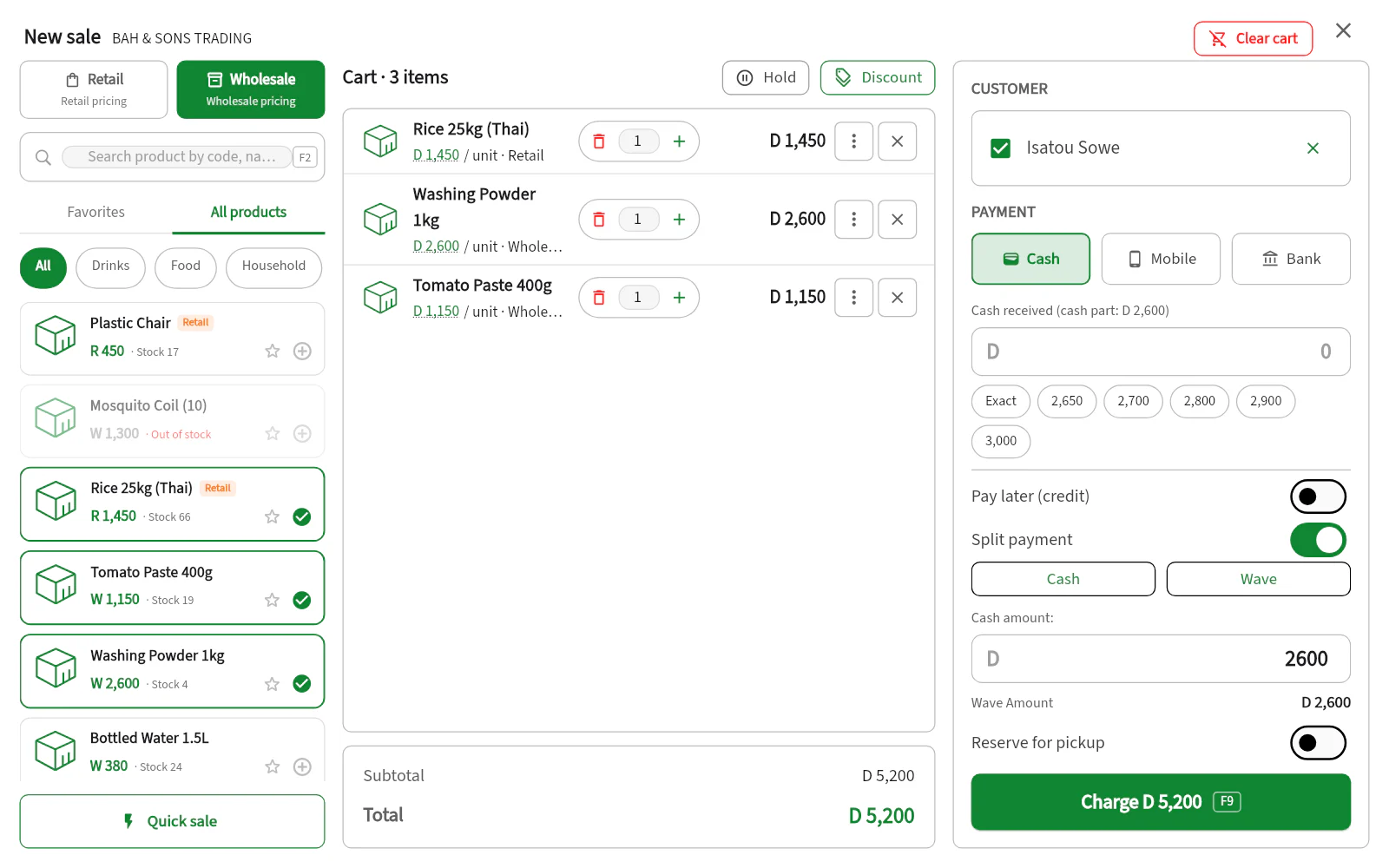
Put a bag of rice at the retail price and a carton at the wholesale price in the same cart, name the customer, and let them pay part cash and part Wave. Every sale is then recorded with who bought, how they paid and for how much.
- ✓Cash, Wave, Afrimoney, QCell, APS and bank side by side
- ✓One sale split across several payment methods, or put on credit (Complete)
- ✓Receipt on WhatsApp or printed, or an invoice (Complete)
Credit without the headache
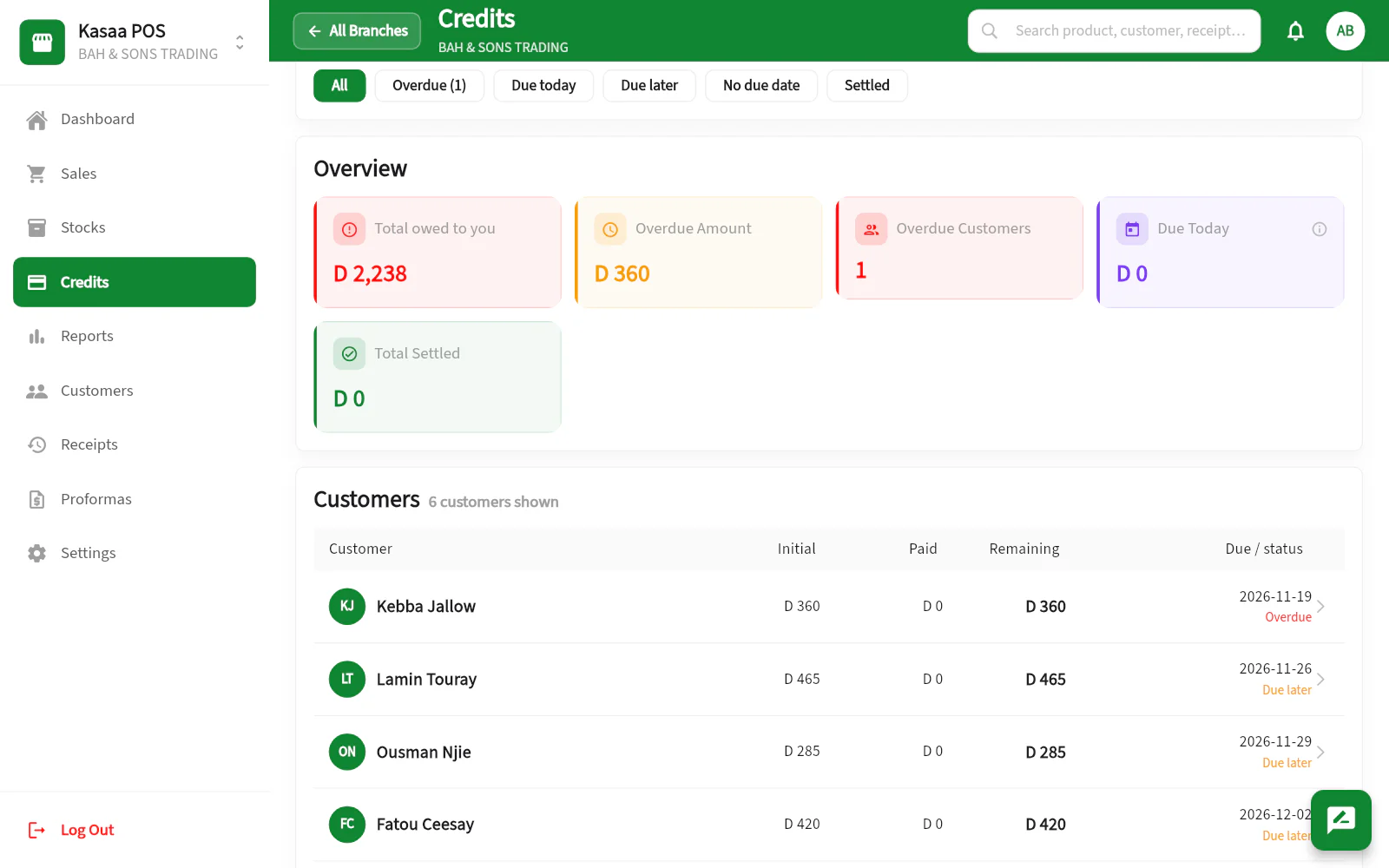
Stop keeping debts in a notebook. Each customer's credit, payments and due date live in one list, split into overdue, due today and on track — so you always know where your money is.
- ✓Outstanding, overdue and settled totals at a glance
- ✓Per-customer balances with next due dates
- ✓Repayments logged against each sale
Know your stock — and your real profit
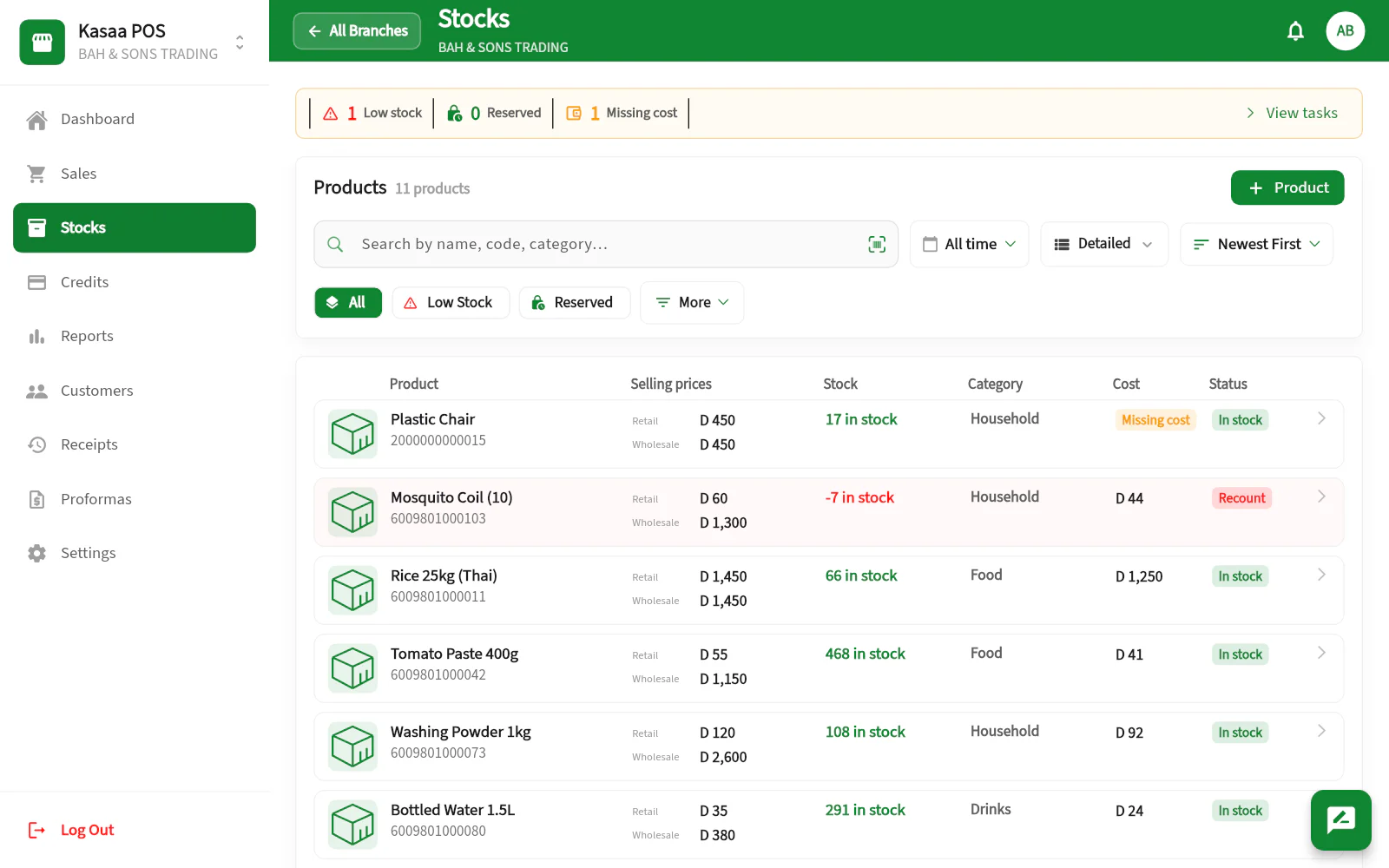
Record the purchase price and what the goods cost to land — transport, delivery, customs — and Kasaa values your inventory and calculates real margins. Low stock and missing costs are flagged, so surprises don't hide on the shelves.
- ✓Sellable value and known cost of your inventory
- ✓Retail and wholesale from one stock, converted for you
- ✓Low stock, missing cost and reserved alerts
Let sellers negotiate, inside your range
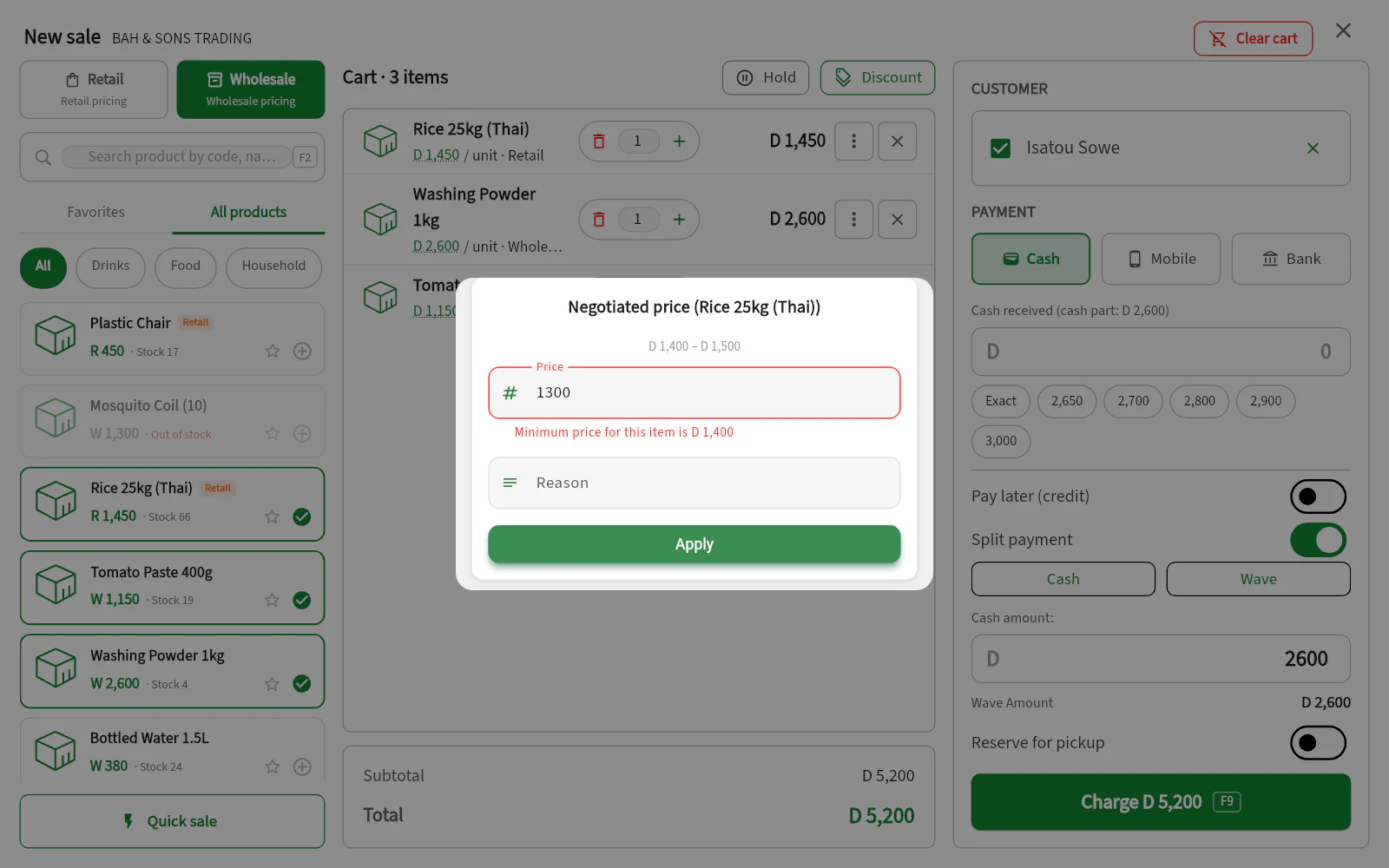
Set a lowest and a highest price for each product. When a seller negotiates an item’s price, Kasaa shows that range and refuses a price outside it. Giving discounts is a separate permission, which you grant person by person.
- ✓A minimum and a maximum negotiated price per product, retail and wholesale
- ✓Cost prices and profit hidden from staff unless you allow them
- ✓Every sale and stock movement signed with the name of who made it
Barcodes
Create professional barcodes. Print your labels. Scan and sell.
Goods imported from China or Turkey rarely carry a barcode you can trust. Kasaa gives those articles a real one — a proper EAN-13 from the range reserved worldwide for in-store use, so it can never collide with a manufacturer’s code — and prints the stickers for you.
- 01
Add the product
Name, price, stock and what it cost you to land.
- 02
Give it a barcode
Keep the manufacturer's, keep your own shelf reference, or let Kasaa create a real EAN-13.
- 03
Print the label
On your label roll, with the price on the sticker. Set the roll size once, in Settings.
- 04
Stick it on the article
Once, before the goods go out — so the same article scans the same way everywhere.
- 05
Scan at the counter
Your phone camera, or a handheld scanner plugged into a computer till.
- 06
Sell — stock follows
The sale is recorded, the stock level drops, and the movement is signed by whoever made it.
A code you typed yourself is never renumbered — it may be written on a shelf edge or in your ledger. And a reprint reproduces the label already on the article, not today’s price.
Works with the equipment on your counter
Kasaa runs on the phone in your pocket and needs nothing else to start. When you are ready to add equipment, it prints through your device’s normal printing — so it works with the printer you already have.
Barcode scanner
Scan with your phone camera, or plug a handheld scanner into a computer till. Both work the same way at checkout.
Receipt printer
Print a till receipt for the customer, or share it as a message instead — the receipt carries your shop name either way.
A4 / A5 printer
With Complete, print a proper invoice or quotation for a business customer, with your tax number and business details on the page.
Barcode label printer
Print your own stickers on label rolls. The roll is set up once in Settings; after that you choose the article and the number of labels.
Computer or POS terminal
Open the web app in a browser for the wider workspace — dashboard, sales, stock, credit, customers and reports.
Phone or tablet
The native app is the counter experience, built for one hand and a busy queue.
Buying equipment? Send us the model first and we will confirm it works with your setup before you spend anything.
See it on your own counter
We will show you Kasaa with your products, then help you set it up.
Free setup help · Works on the phone you already have · No equipment to buy